
Same agent. Same model. Up to 31% cheaper.
That's what Microsoft's free plugin, TokenEconomizer, did to coding agent costs in Microsoft's tests with Claude Code, Codex and GitHub Copilot CLI: 18.4–30.9% lower across five setups, with about as many tasks solved as before. On a $1,000 monthly bill, the best case leaves about $690. You don't change the agent or the model. The plugin learns from your earlier sessions in the same project.
So where was the money going? You open the bill at the end of the month and wonder what your coding agent spent it on. Much of it went on the same work, again and again. It loads tools it never uses, rediscovers the same facts about your project, and keeps trying a fix that has already failed.
If you only read this:
- Turn off the tools your agent doesn't use. You pay for their descriptions on every turn.
- Write your project's facts (test command, setup steps) into the agent's instructions file once.
- Stop the agent when it repeats the same error twice.
- Try TokenEconomizer if your team uses the same agent in the same codebase every day.
Below: where the tokens go, why the obvious fix (turning the effort setting down) costs you quality, what the tests show, and my take on who should try it.
If your team runs coding agents every day and the bill keeps growing, message me on WhatsApp. I'll tell you where I'd look first.
Why coding agent costs keep growing
A coding agent is billed for everything it reads, on every turn. Each turn resends the instructions, the list of tools it may use and the conversation so far, so earlier content is charged again and again as a task goes on.
Most cost work so far has looked at one task at a time. Real teams don't work like that. They use the same agent in the same codebase every day. Microsoft's research looks at sequences of tasks in one project, and that is where it finds the waste: costs that repeat because the agent learns nothing between sessions.
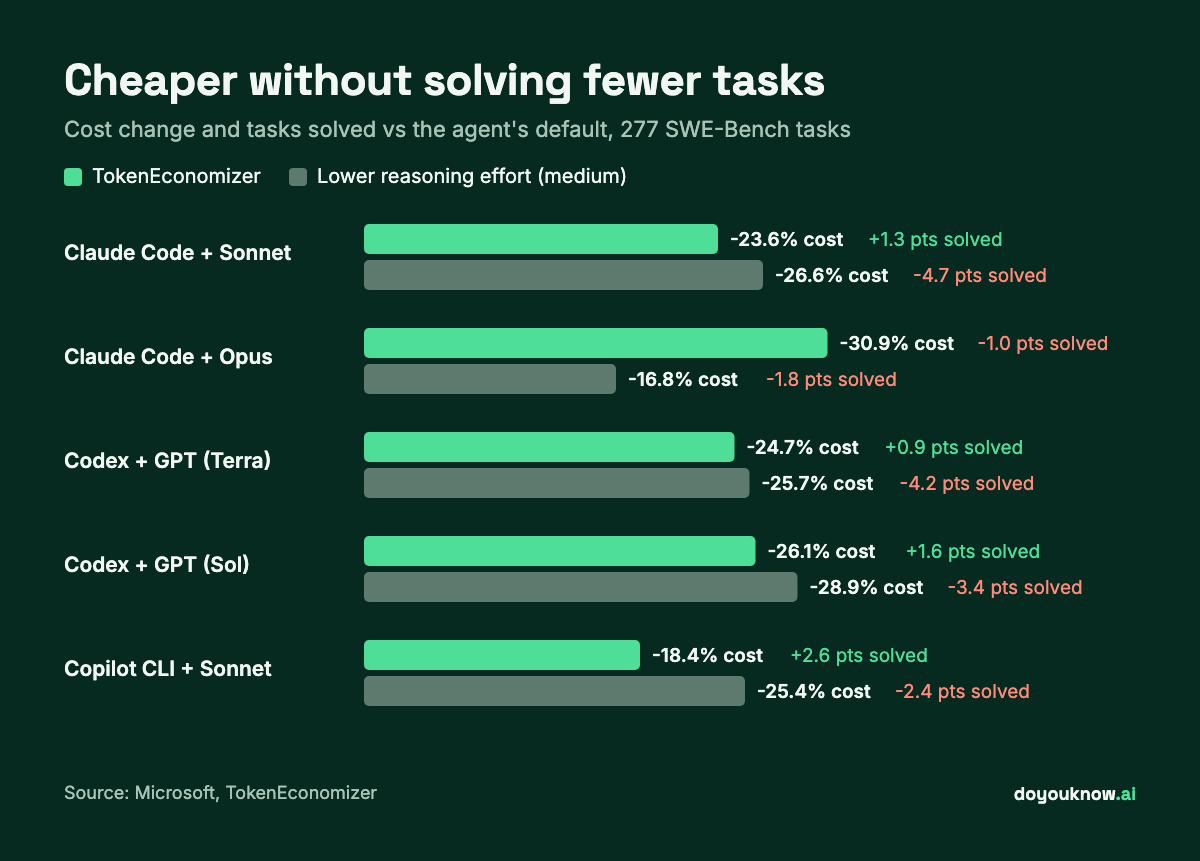
The obvious fix, turning the model's reasoning effort down, saves money but costs quality. In Microsoft's tests, medium effort cut costs by 16.8–28.9% but solved 1.8–4.7 percentage points fewer tasks, and low effort cut 31.0–45.5% but solved 3.6–10.3 points fewer.
Where the tokens go: three leaks
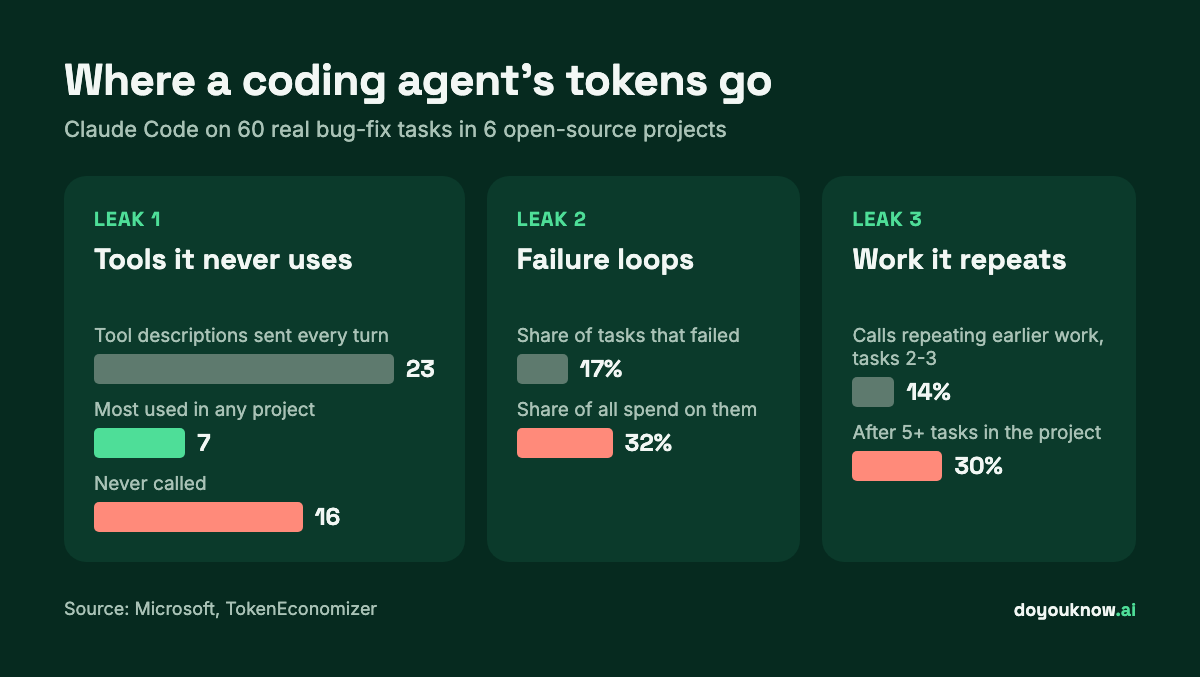
The researchers ran Claude Code on 60 real bug-fix tasks from six open-source Python projects (scikit-learn, SymPy, Django, Sphinx, Matplotlib and xarray) and traced every call. Three leaks stood out.
1. Tools it never uses
The agent was shown 23 tool descriptions on every turn, yet no project used more than 7. 16 tools were never called at all, and 3 tools made 98% of all calls. You pay to send those unused descriptions with every single turn. In one Django example from Microsoft's tests, hiding 19 unused tools cut the agent's first request from 43,351 tokens to 16,295: 62% fewer before any work started.
2. Work it repeats
In each project, the same actions came back task after task: the same test command, the same setup, the same searches. Actions that recur in at least half of a project's tasks made up 12–28% of the data its tool calls sent and received. Once five or more tasks had run in a project, 30% of the agent's calls matched something it had done before.
3. Failure loops
Failed tasks were 17% of the tasks but 32% of the money. The agent kept repeating the same error, and 51% of all spend came after a run first repeated an earlier failure. A simple turn limit doesn't fix it, because many successful runs also repeat an error before they recover.
How TokenEconomizer cuts each leak
TokenEconomizer sits outside the agent. It watches sessions in a project, learns, and changes only what the agent already lets you configure: the prompt, the tool list and a nudge when it's stuck. It treats the agent as a black box, so it doesn't need access to the model.
Unused tools → tool pruning. It hides tools that went unused over 10 prompts across at least 2 sessions, or over 5 sessions. Safety net: a hidden tool comes back at the next check, and one command restores everything.
Repeated work → micro-skills. It learns short facts about your project, such as the right test command, and adds them to the prompt once three sessions confirm them. Safety net: a fact is dropped as soon as a later session contradicts it. This part is off by default, because learning the facts takes extra AI calls.
Failure loops → loop guard. When a turn repeats the same failure, it asks a second AI call (a "judge") whether the agent is stuck. If the judge is at least 70% sure, the agent gets one redirect. Safety net: it never stops the agent itself; it tells you how to interrupt.
Learned facts are stored on your machine in ~/.tokeneconomizer. The plugin never handles your credentials: its own model calls run through your agent and your login, and their cost is counted in its savings figures.
What the tests show
The team ran 277 tasks from SWE-Bench, a standard set of real bug fixes taken from open-source projects, across the six projects, three times each, with five agent and model setups. Costs include the plugin's own model calls.
| Agent and model | Cost change | Tasks solved (default → with TokenEconomizer) |
|---|---|---|
| Claude Code + Sonnet | −23.6% | 74.7% → 76.0% |
| Claude Code + Opus | −30.9% | 74.0% → 73.0% |
| Codex + GPT (Terra) | −24.7% | 73.8% → 74.7% |
| Codex + GPT (Sol) | −26.1% | 80.1% → 81.7% |
| Copilot CLI + Sonnet | −18.4% | 75.0% → 77.6% |
Terra and Sol are two of OpenAI's GPT models; the exact versions tested are on Microsoft's TokenEconomizer page. Cost change is the paired change against the agent's default at high reasoning effort.
Three results matter for a team deciding whether to try it:
- It was cheaper everywhere. All 30 combinations of project and setup cost less, by 5.2–40.1%. The fixed tools it was compared with were not: one raised costs in 12 of the 30, another in 15.
- Quality held. Tasks solved went up in 4 of the 5 setups and fell by 1 point in the fifth.
- It gets better with use. It starts with no history, so the first few tasks in a project can cost a little more. By the sixth task every project was cheaper, and stayed cheaper.
Which part saves the most
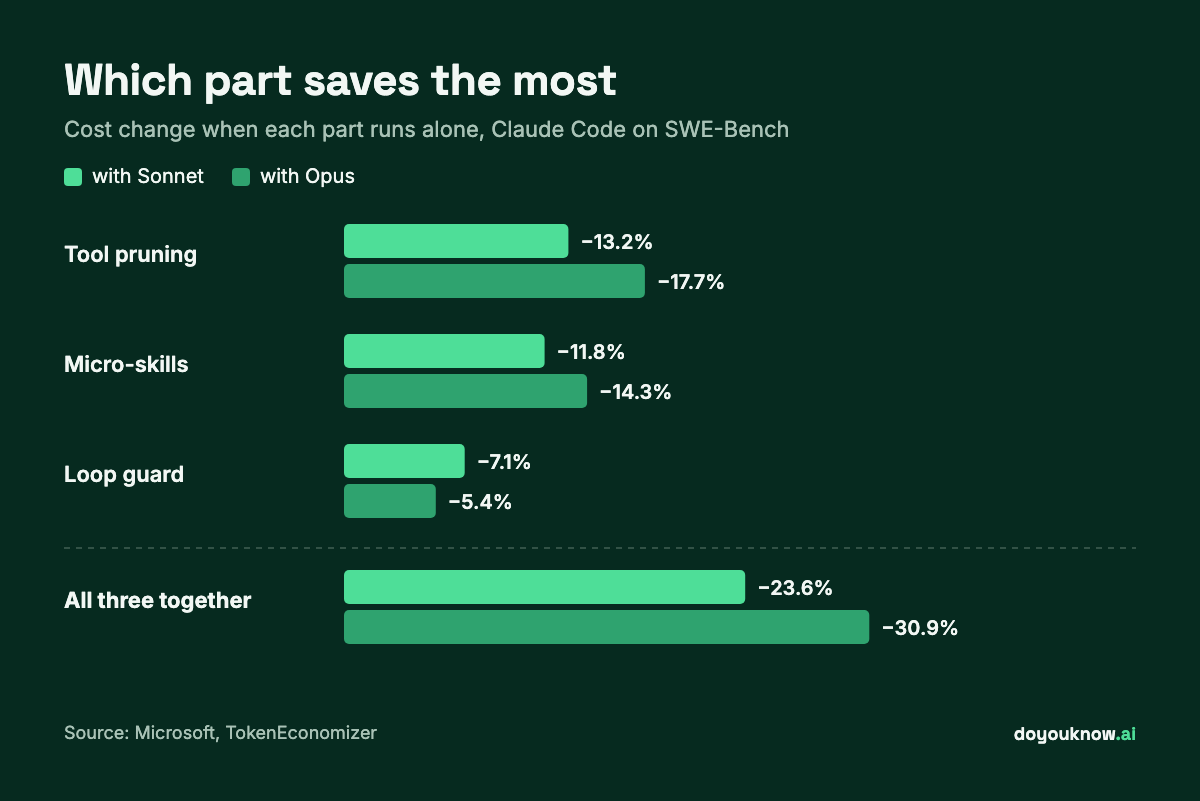
Tool pruning saves the most on its own, because it works on every turn of every task. Micro-skills come close. The loop guard saves less but stops the most expensive failures. None of the three alone matches the full set.
Beyond bug fixes
The savings carried over to other work: 16.0–21.2% on sequential web development (Web-Bench) and 6.4–19.6% on two security-audit benchmarks. They were smallest where tasks were short and each one was in a different codebase, so there was little to learn.
My take
Here's how I read this. The plugin is clever, but the bigger lesson is simple: most of the waste is boring.
Tools nobody switched off. A test command the agent has to find again every session. A loop nobody stopped. You can fix much of that yourself in an afternoon, with the steps below.
If your developers use Claude Code, Codex or Copilot CLI in the same codebase every day, try the plugin on one project for two weeks and compare the bill. If you run an agent now and then for one-off scripts, don't bother. It has nothing to learn from, and the first few sessions can cost a little more.
Before you install it
TokenEconomizer helps most when the same people use the same agent in the same codebase every day. That's where it has history to learn from. It is free and open source (Apache 2.0) and works with Claude Code, Codex, GitHub Copilot CLI and Pi (a minimal coding agent), with experimental support for opencode (an open-source coding agent).
Be careful about three things:
- These are the authors' own tests. I found no independent replication yet. The tasks were related but separate bug fixes, not real team sessions. The authors expect real sessions to save more, but that is still to be tested.
- Savings vary by project. Across projects the range was 5–40%. Measure your own bill before and after.
- Check the supported versions. The plugin lists the agent versions it was tested with. Newer agent versions are untested, so check the GitHub page before you install.
How to try it
You need Python 3.10 or later; the plugin needs no API key of its own. Clone it once into a folder you keep, then add it to your agent:
Claude Code
git clone https://github.com/microsoft/TokenEconomizer.git
claude plugin marketplace add "$PWD/TokenEconomizer"
claude plugin install tokeneconomizer@tokeneconomizer
Start Claude Code in one of your projects, trust the folder, and run /tokeneconomizer:status.
Codex
git clone https://github.com/microsoft/TokenEconomizer.git
codex plugin marketplace add "$PWD/TokenEconomizer"
codex plugin add tokeneconomizer@tokeneconomizer
Trust the folder and its hooks, restart Codex, and run $tokeneconomizer:status.
GitHub Copilot CLI
git clone https://github.com/microsoft/TokenEconomizer.git
copilot plugin marketplace add "$PWD/TokenEconomizer"
copilot plugin install tokeneconomizer@tokeneconomizer
Trust the folder and run /tokeneconomizer:status.
Pi, opencode, updating and uninstalling are covered on Microsoft's TokenEconomizer page. Note your cost per task for a week first, so you can see the difference.
Cut coding agent costs this week, with or without the plugin
You can act on the same three leaks yourself today:
- Turn off tools you don't use. Most agents let you limit which tools and connected services load. Fewer tool descriptions means a cheaper turn, every turn.
- Write your project's facts down once. Put the test command, setup steps and project quirks in the agent's project instructions file, so it stops rediscovering them.
- Stop loops early. If the agent repeats the same error twice, interrupt it and point it in a new direction. That's the most expensive time it spends.
- Don't just lower the effort setting. It saves money, but in these tests it also solved fewer tasks.
- Measure. Track cost per task, not just the monthly total, so you can see what each change does.
Choosing which assistant your team uses matters too: see Claude vs ChatGPT: which to use for which job. If you're earlier in the journey, start with AI for small businesses: where to start.
I've spent 20 years in product, development and automation. If you'd like a plan for your team's AI coding costs, book a consulting session, or I can set it up for you through implementation.
FAQ
What is TokenEconomizer?
TokenEconomizer is a free, open-source plugin from Microsoft Research that lowers the token cost of AI coding agents. It learns from earlier sessions in the same project to prune unused tools, add short project facts to the prompt and redirect the agent out of failure loops, without changing the agent or its model.
How much does TokenEconomizer save?
In the authors' tests on 277 SWE-Bench tasks, average cost fell by 18.4–30.9% across five agent and model setups, with tasks solved about the same. Savings per project ranged from 5% to 40%. These are the authors' results; measure your own.
Which coding agents does it work with?
Claude Code, Codex, GitHub Copilot CLI and Pi (a minimal coding agent), with experimental support for opencode. Each has its own install steps and tested versions on the project's GitHub page.
Does TokenEconomizer send my code anywhere?
Its learned facts are stored locally in ~/.tokeneconomizer. It never handles your credentials. Its own model calls, such as the loop-guard judge, run through your agent and your login, like any other agent request.
Why are AI coding agents so expensive?
Every turn resends the instructions, the tool descriptions and the conversation so far, so the same content is billed many times. Agents also repeat work between sessions and can loop on a failing fix. In Microsoft's tests, failed tasks were 17% of tasks but 32% of the spend.
Is lowering reasoning effort a good way to save?
It saves money but costs quality. In Microsoft's tests, medium effort cut costs by 16.8–28.9% but solved up to 4.7 points fewer tasks; low effort solved up to 10.3 points fewer.
Sources
- Microsoft, TokenEconomizer on GitHub.
